At the bottom of every passport’s photo page are two lines of capital letters, digits and chevrons. That machine-readable zone repeats what is printed above it, and it carries check digits: numbers computed from the fields next to them by a published formula. Anyone can recalculate them. When one does not add up, the document has been misprinted, mistyped or altered, and the analyst needs to know which before going further.
In short
- Check digits are arithmetic, not judgement. ICAO Document 9303 defines them: weight the characters 7, 3, 1 repeating, add, and take the last digit. A machine can verify them every time.
- A failed check digit is a finding, not a verdict. It means the zone does not agree with itself. The cause might be a misread, a scan of poor quality, a printing error or tampering.
- Quote the line. The check should show the zone it read and which digit failed, so the analyst can look at the document and decide.
- Other checks still matter. In this case every other check passes, and the case is rated prohibited for an unrelated reason. Each finding is resolved on its own.
The situation
This case uses InsightKYC’s demo data for Harbourline Bank, a fictional bank. Ali Al-Farsi
applies for a personal account. He lives in New York and holds a passport issued by Iran. The case
opens as KYC-2026-000010. The passport and a proof of address are on file, and the
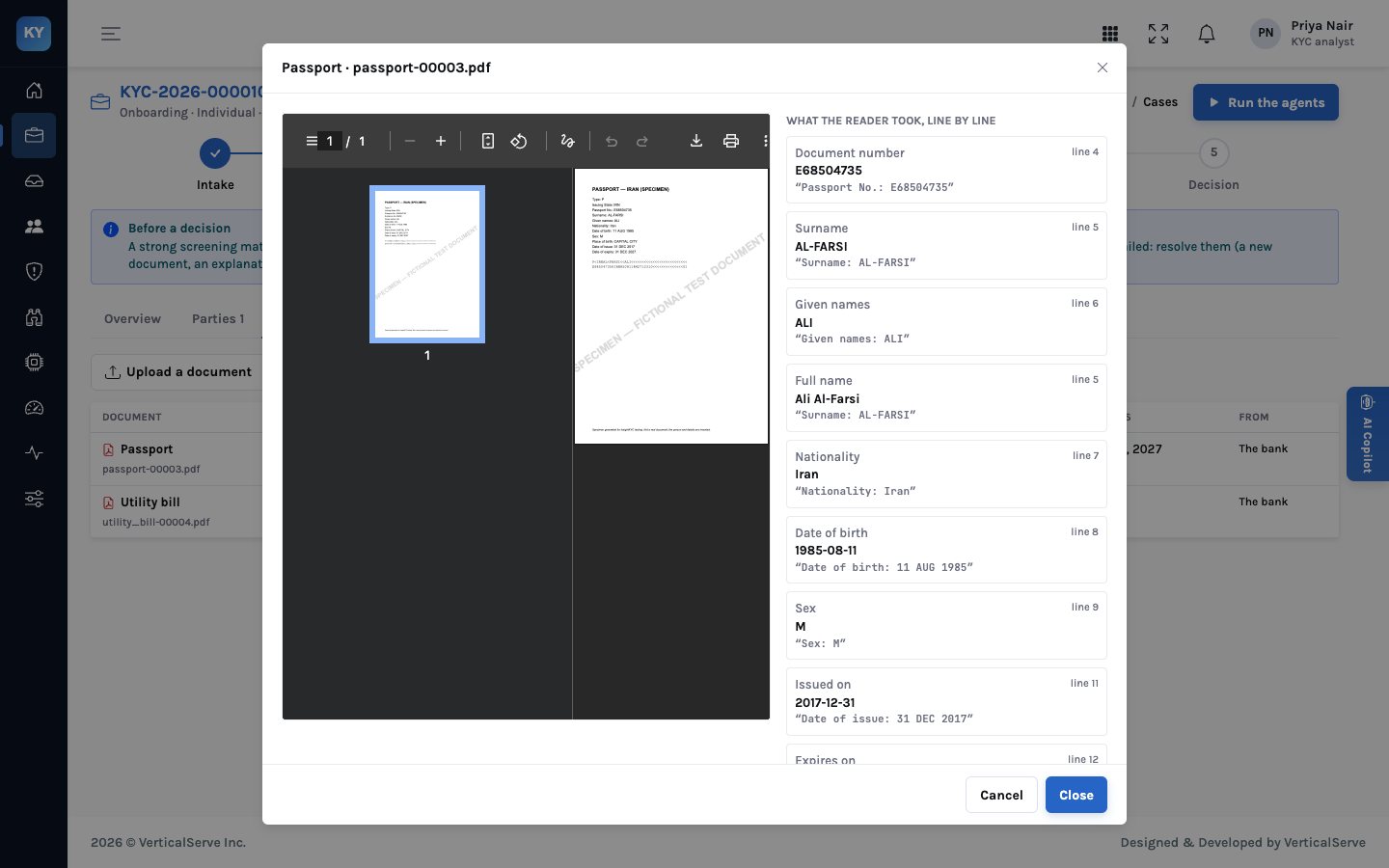
document reader turns each into fields, each quoted from the line it came from.
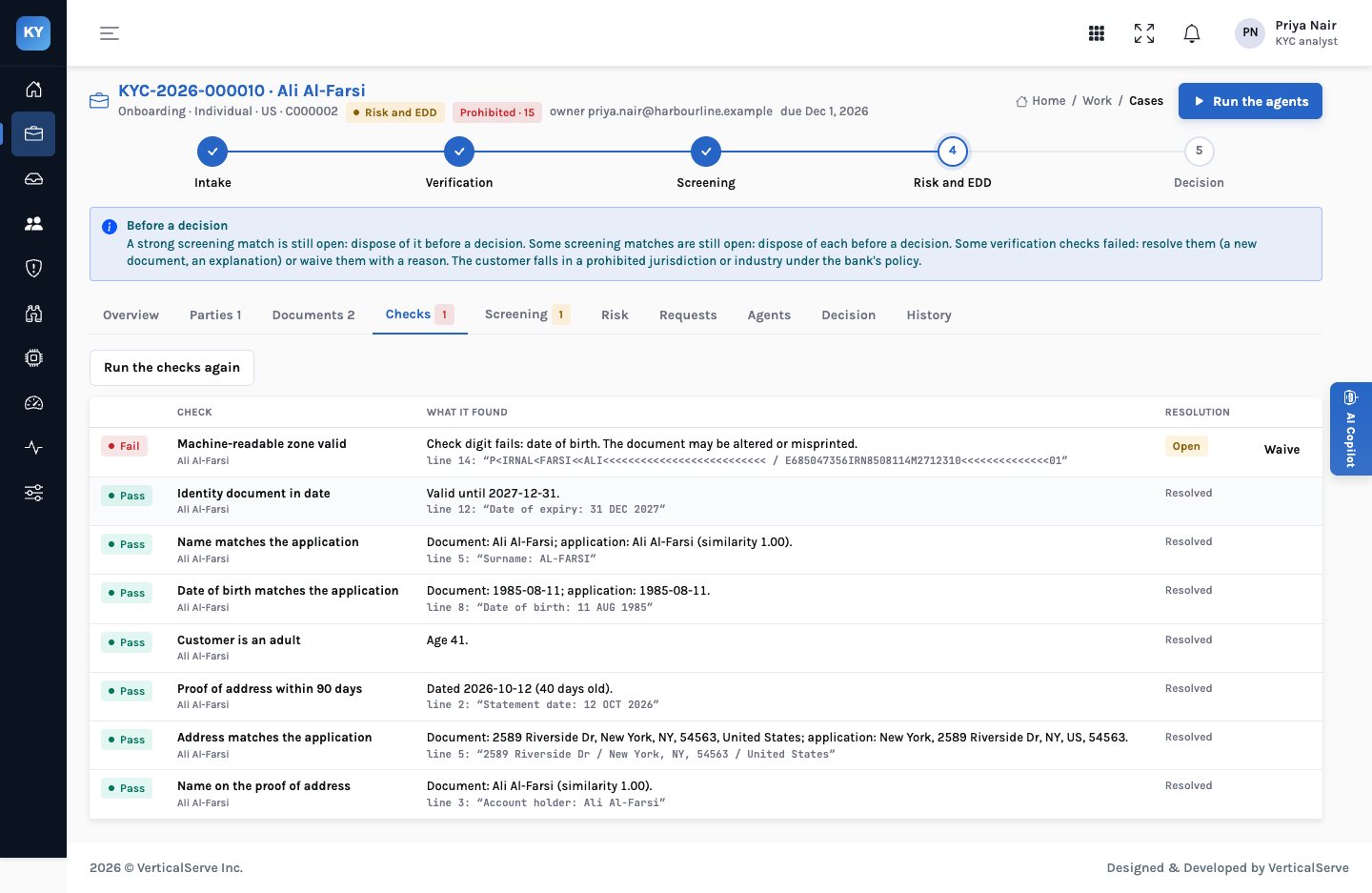
The verification agent runs the checks. Eight pass. One fails:
| Check | Outcome | What it found |
|---|---|---|
| Machine-readable zone valid | Fail | Check digit fails: date of birth. The document may be altered or misprinted. |
| Identity document in date | Pass | Valid until 2027-12-31 |
| Name matches the application | Pass | Ali Al-Farsi on both (similarity 1.00) |
| Date of birth matches the application | Pass | 1985-08-11 on both |
| Customer is an adult | Pass | Age 41 |
| Proof of address within 90 days | Pass | Dated 2026-10-12, 40 days old |
| Address matches the application | Pass | The same New York address on both |
| Name on the proof of address | Pass | Account holder: Ali Al-Farsi |
How a check digit works
ICAO Document 9303, the international specification for machine-readable travel documents, defines one
rule for every check digit. Each character gets a value: digits keep their value, letters A to Z count
10 to 35, and the filler < counts 0. The values are multiplied by the weights 7, 3, 1,
7, 3, 1 and so on, the products are added, and the check digit is the last digit of the sum.
In the demo passport the date of birth in the zone is 850811, meaning 11 August 1985,
followed by the check digit 4. Working it out:
| Character | 8 | 5 | 0 | 8 | 1 | 1 | |
|---|---|---|---|---|---|---|---|
| Weight | 7 | 3 | 1 | 7 | 3 | 1 | |
| Product | 56 | 15 | 0 | 56 | 3 | 1 | sum 131 |
The sum is 131, so the check digit should be 1. The zone says 4.
The expiry date, 271231, does check out: its products add to 60, and the zone carries 0.
So the date of birth field in the zone does not agree with its own check digit, even though the date
printed in the visual zone, 11 AUG 1985, matches the application.
The check is pure arithmetic. The decision about what it means is the analyst’s.
Why this is easy to miss by hand
An analyst looking at a passport scan compares the photo, the name and the dates with the application. The machine-readable zone looks like noise, and recalculating a weighted sum by eye for each field is not something anyone does at volume. Document-verification services do check it, but often only when the document is captured in a particular way, and the result arrives as a pass or fail score without the line it read.
Either nobody recalculates the digits, or a vendor score says “document check failed” and the analyst has to work out why.
The check says which digit failed, quotes the zone, and sits next to the visual fields the reader took from the same page.
Reading the passport
The document viewer shows the PDF beside what the reader took from it. Each field has its value, the line number and the text it was read from. The machine-readable zone appears with a badge for each check digit: document number, date of birth, expiry, and the composite. The analyst can see at a glance which one failed, then look at the page itself.
A separate finding: the rating
This case is also rated prohibited, for a reason that has nothing to do with the passport. The demo’s illustrative country policy lists Iran, North Korea and Myanmar as prohibited, and the customer’s nationality is Iranian. That setting is an illustration for a fictional bank, not advice: each bank sets its own policy from its legal obligations, its sanctions programme and its risk appetite. In InsightKYC a prohibited rating blocks approval whatever the points add up to, and the case controls say so.
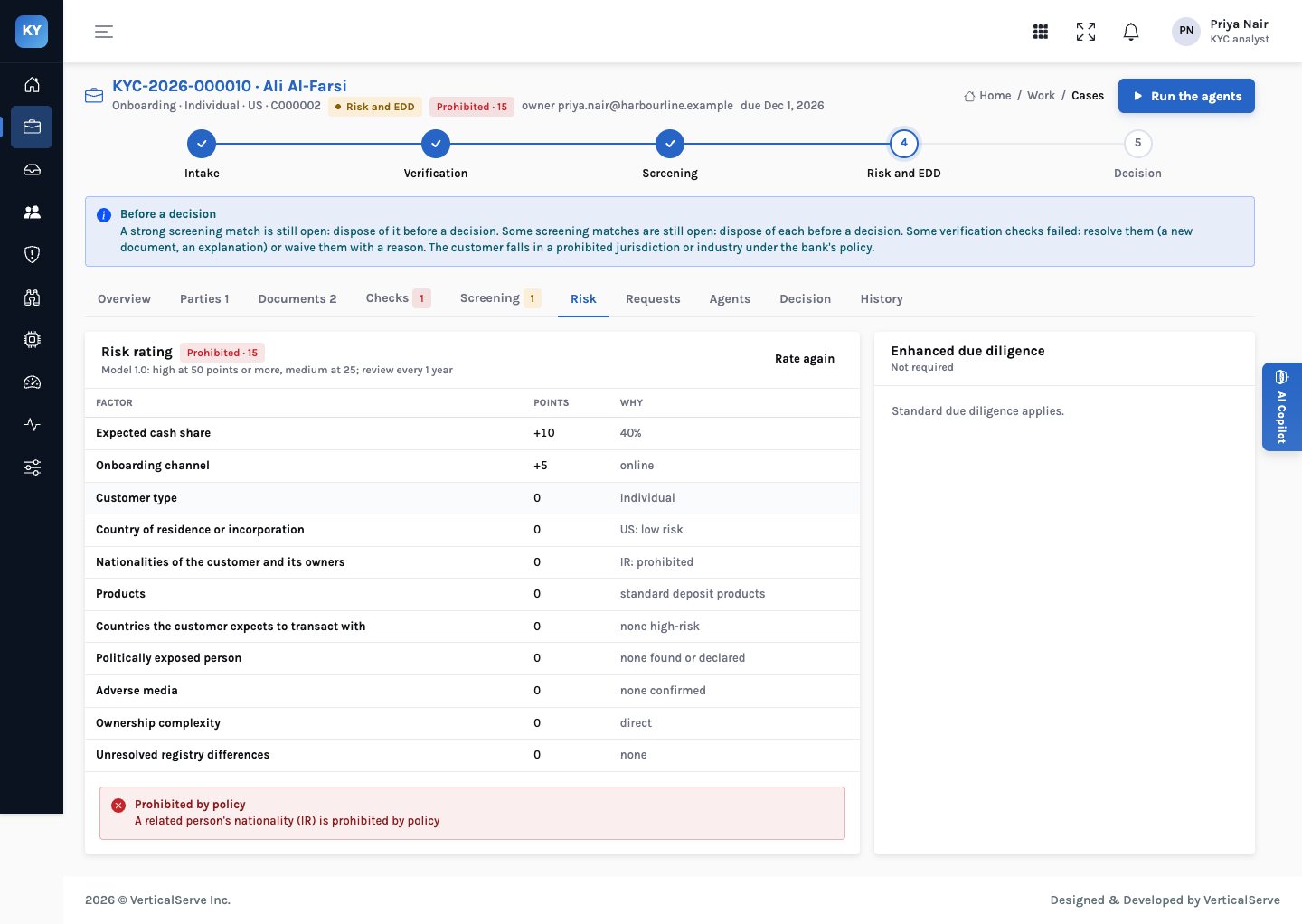
The two findings are resolved separately. Even if the bank’s policy changed, the check digit would still need an answer, and even if the passport were reissued, the policy would still apply.
Who does what
The agent can prepare a request for a better copy; it cannot waive the check or escalate a suspected fraud.
Note which digit failed and the zone quoted. A single failed field differs from every check digit failing.
Open the viewer. Compare the printed date of birth with the zone. Is the image clear? Is anything misaligned?
If the scan may be the cause, accept or write a request for a clearer copy or a certified copy. It is held until you send it.
The new upload is read and every check runs again. A passing zone resolves the finding.
A document that still fails, or looks altered, goes to the bank’s fraud or financial-crime procedure. Don’t ask the customer about suspected tampering in a way that tips them off.
If a lead agrees the failure is explained, for example by a known issuer printing error, waive the check with the reason. It stays on the decision record.
The analyst’s choices
| Observation | Likely cause | Action |
|---|---|---|
| One check digit fails, the image is blurred | Misread or poor scan | Request a clearer copy |
| One check digit fails, the printed and zone values differ | Possible alteration of one field | Escalate under the fraud procedure |
| Every check digit fails | Wrong document type read, or a non-standard zone | Confirm the document type; read again |
| The issuer has a known printing error | Genuine document | Waive with the reason, approved by a lead |
What it means for each audience
For the CCO & MLRO
A document check that can be reproduced by anyone with the ICAO specification is easy to defend. The finding shows the arithmetic’s input; an examiner can recompute it.
Fraud escalation stays a person’s decision, made under the bank’s own procedure.
For the KYC operations lead
The check runs on every passport, not only on the ones someone thought to look at. A failure arrives with the zone quoted, so the analyst spends time deciding, not finding.
A request for a clearer copy is already drafted.
For the board
Identity fraud usually starts with a document. A control that recalculates every machine-readable zone is cheap, and its results are evidence.
It is one control among several, not a guarantee.
Metrics to track
What to be careful about
- A passing check digit is not proof of authenticity. Anyone forging a document can compute valid check digits. The check catches errors and careless alteration, not skilled forgery.
- Read quality matters. A blurred scan can turn a 1 into a 7. Ask for a better copy before concluding anything.
- Don’t tip off. If tampering is suspected, follow the bank’s procedure for suspicious activity. The request to the customer should not reveal the suspicion.
- Policy settings are the bank’s. The prohibited-country list in the demo is illustrative, set for a fictional bank.
A check digit is the one part of a passport that can be checked with arithmetic. Do it every time.
Then spend the analyst’s time on the question arithmetic can’t answer: why it failed.